Native macOS 14+ App

Track AI usage
before limits
break your flow.

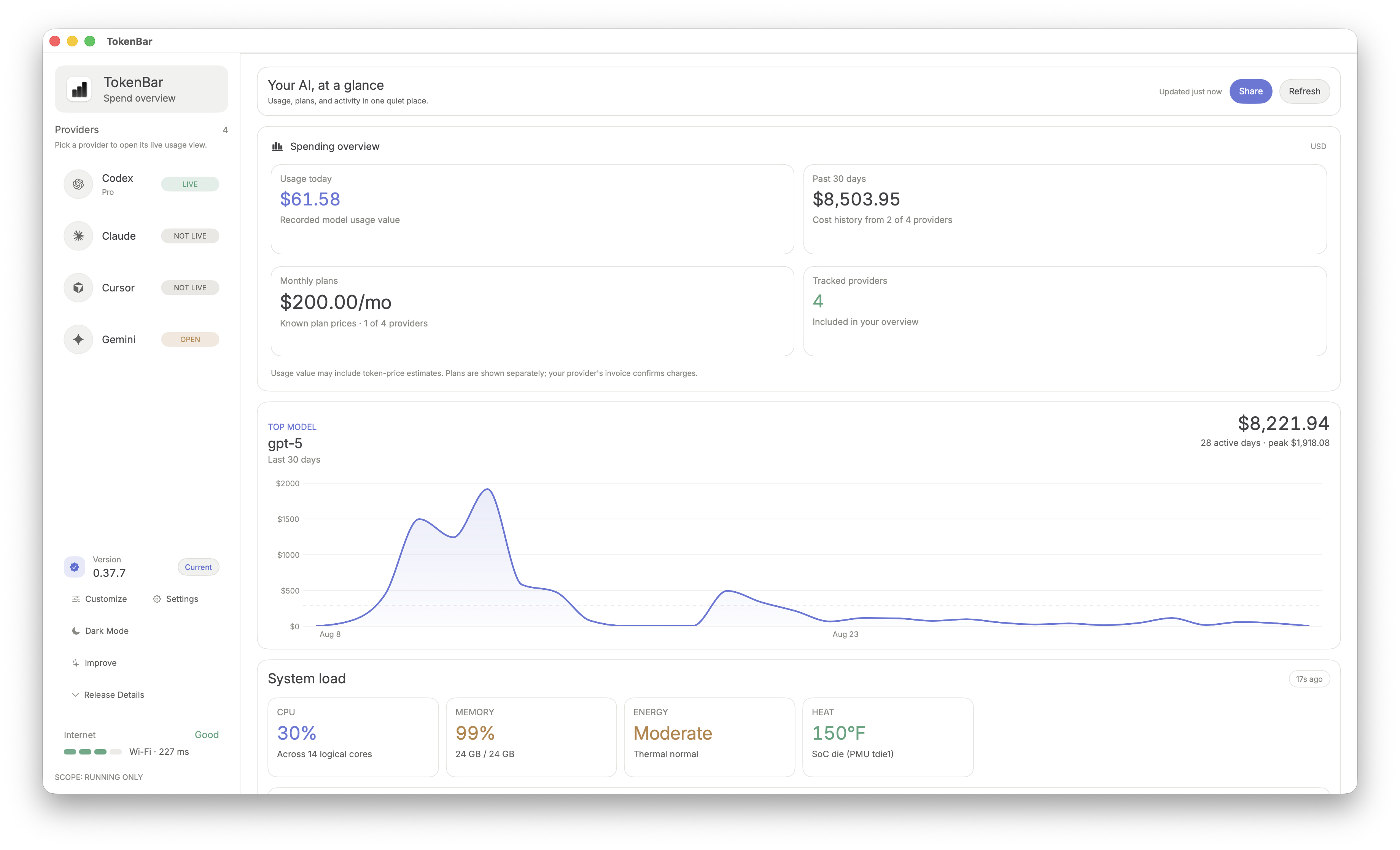
TokenUsage is a macOS menu bar monitor for AI tools. Track usage limits, credits, reset windows, pace, and incidents across providers with alerts, history, and automation-ready CLI output.

The public page intentionally shows the essentials. Advanced account workflows, deep usage views, and full automation controls are unlocked after purchase.

  • All analytics are local-first on your Mac
  • One-time payment license with no recurring monthly fee
  • Tracks limits, credits, reset windows, and pace across 20+ providers
Scroll to explore
CodexClaudeGeminiCursorOpenRouterCopilotVertex AIPerplexityChatGPTDeepSeekMistralCodexClaudeGeminiCursorOpenRouterCopilotVertex AIPerplexityChatGPTDeepSeekMistral

Core Control Surface

Everything needed for daily AI usage ops.

One clean dashboard for limits, pacing, incidents, and account routing, without noisy dashboards or unnecessary settings sprawl.

01

Live Usage Windows

Track session, weekly, monthly, and credit windows with reset countdowns or exact reset timestamps.

02

Pace + Budget Mode

Monitor on-pace, deficit, and reserve status with projected runout timing and target-day planning controls.

03

Alerts + Incidents

Configure custom thresholds and get depleted/restored signals alongside provider outage and recovery events.

04

Single or Multi-Provider

Use one icon per provider or switch to Merge Icons mode with account switching and a unified overview tab.

Advanced workflows after core usage tracking is in place.

These modules are for teams that need cost visibility, automation hooks, stricter privacy controls, and more detailed operational reporting.

Cost Tracking

Track local Codex + Claude spend with today and rolling 30-day views, plus optional dashboard enrichments.

CLI + Automation

Use the tokenbar CLI for scripts and CI with text/JSON output, provider filters, status checks, and cost reports.

Offline-First Privacy

Local-first analytics with configurable keychain/cookie modes, manual fallback options, and focused data access paths.

Incident Timeline

Chronological incident stream for provider outages, recoveries, and quota restoration events in one place.

Account Modes + Merge

Run single-provider mode, one-icon-per-provider mode, or Merge Icons with instant account switching.

Reporting Windows

Review usage snapshots by session/day/week/month with export-ready summaries for team retros and planning.

Security + Privacy

  • Offline-first design with local-first processing for usage analytics
  • Supports provider APIs, local CLI output, browser cookie sessions, and OAuth/API tokens depending on setup
  • Cookie import supports automatic browser import and manual cookie headers
  • Keychain and cookie access can be restricted with manual-only modes
  • Designed to avoid broad background data collection and focus on known provider data paths

Install + CLI

  • One-time payment license with no recurring subscription
  • macOS 14+ app (Apple Silicon + Intel) via GitHub Releases or Homebrew cask
  • Linux support is CLI-only via Homebrew or release tarballs
  • WidgetKit menu-card snapshots and keyboard shortcut support
  • Start-at-login, refresh cadence controls, and update channels
  • Built-in account switching and stacked account display support

Provider Coverage (20+)

Built for multi-tool workflows. TokenUsage tracks limits, credits, resets, and status signals from one menu bar surface. The full compatibility matrix and advanced source modes are unlocked inside the app.

Workflow Modes

  • Single-provider mode for focused tracking
  • Multi-provider mode with one icon per provider
  • Merge Icons mode with provider switcher
  • Overview tab with configurable provider ordering

Provider Examples

Codex

Claude

Cursor

Gemini

Copilot

Vertex AI

OpenRouter

Plus additional providers and account modes in the full build.